
This Excel VBA tutorial explains how to find all Cells contain Named Range using Macro.
You may also want to read:
Find all external links and broken links in workbook
Replace Named Range with formula
Find all Cells contain Named Range
In Excel spreadsheet, we can define Named Range under Name Manager (Formulas > Name Manager)
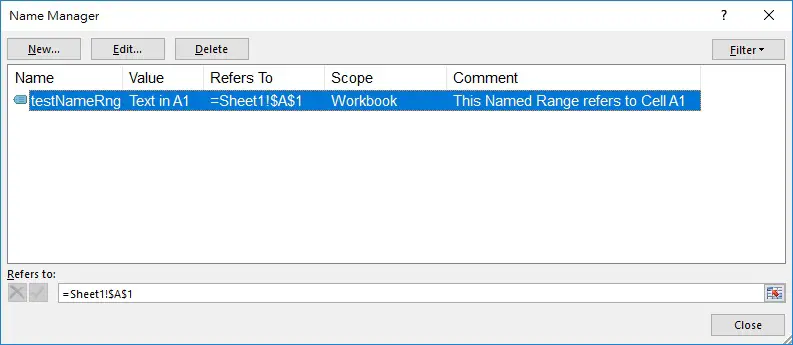
We can refer to Name Manager to see the formula the Named Range is referring to, but it does not tell which Cells are using the Named Range. Therefore, it is necessary to loop through all Cells that contain the Name of Named Range.
In my previous post, I explained how to use some common Properties of Name Object. In this post, I will demonstrate a Macro that can find all Cells contain Named Range, and then list the details in a new Worksheet.
VBA Code – find all Cells contain Named Range
Press ALT+F11 and then insert the below code in the Module.
Public Sub find_namedRng()
    Sheets.Add
    shtName = ActiveSheet.Name
    Set summaryWS = ActiveWorkbook.Worksheets(shtName)
    summaryWS.Range("A1") = "Worksheet"
    summaryWS.Range("B1") = "Cell"
    summaryWS.Range("C1") = "Formula"
    summaryWS.Range("D1") = "Named Range"
    summaryWS.Range("E1") = "Refers To"

    For Each ws In ActiveWorkbook.Worksheets
        For Each Rng In ws.UsedRange
            If Rng.HasFormula Then
                For Each namerng In Names
                    If InStr(CStr(Rng.Formula), namerng.Name) > 0 Then
                        nextrow = summaryWS.Range("A" & Rows.Count).End(xlUp).Row + 1
                        summaryWS.Range("A" & nextrow) = ws.Name
                        summaryWS.Range("B" & nextrow) = Replace(Rng.Address, "$", "")
                        summaryWS.Hyperlinks.Add Anchor:=summaryWS.Range("B" & nextrow), Address:="", SubAddress:="'" & ws.Name & "'!" & Rng.Address
                        summaryWS.Range("C" & nextrow) = "'" & Rng.Formula
                        summaryWS.Range("D" & nextrow) = namerng.Name
                        summaryWS.Range("E" & nextrow) = "'" & namerng.RefersTo

                    End If
                Next namerng
            End If
        Next Rng
    Next ws

    Columns("A:E").EntireColumn.AutoFit
    lastrow = summaryWS.Range("A" & Rows.Count).End(xlUp).Row

    If lastrow = 1 Then
        MsgBox ("No Named Range found")
        Application.DisplayAlerts = False
        summaryWS.Delete
            Application.DisplayAlerts = True
    End If
End Sub
Result
Suppose there are two Cells that contain Named Range in the Workbook, below is the result which lists out all the details.

Note that this Macro has a limitation, you cannot give Named Range similar names.
For example, you cannot create a Named Range called testNameRng and then name another called testNameRng2, because testNameRng is contained in testNameRng2, you have to give a different name.