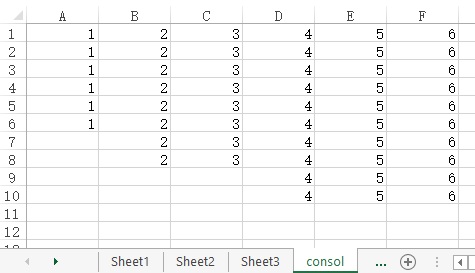
This Excel VBA tutorial demonstrates how to combine worksheets columns into one worksheet.
You may also want to read:
Excel VBA Consolidate worksheets into one worksheet
Excel VBA consolidate multiple workbooks into one workbook
Excel convert data from column to row
Excel VBA combine worksheets columns into one worksheet
There are two types of combine worksheets
- Worksheets have the same structures / headers, create a blank worksheet and paste the data from different worksheets down the row
- Worksheets have different structures / headers, create a blank worksheet and paste the data from different worksheets in new column
This tutorial demonstrates the second type using Excel VBA.
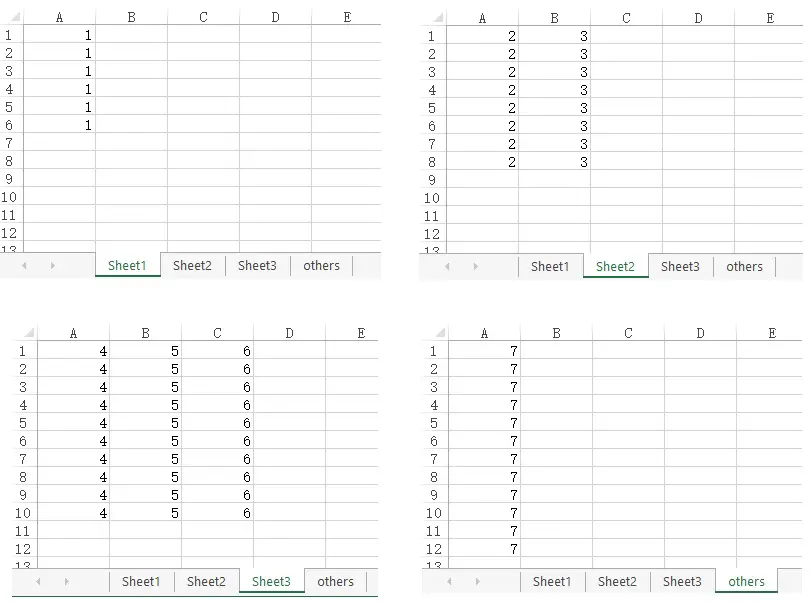
Assume that we have 4 worksheets.
Step 1: Insert Macro
Press ALT+F11, insert a Module and paste the below code
Public Sub combineCol()
    Dim dataShtNm As String  'the sheet name of source data
    Dim consolShtNm As String
    Dim consolLastRow, loopedShtLastRow, loopedShtLastCol As String
    Dim msgboxRslt As Integer
    consolShtNm = InputBox("Enter the worksheet name that you want to conlidate data in")
    If consolShtNm = "" Then
        msgboxRsltDummy = MsgBox("Action cancel", vbInformation)
        Exit Sub
    Else
        dataShtNm = InputBox("Enter wildcard conditions for worksheet name that you want to consolidate data from" & vbCrLf & vbCrLf & "For example, type data* to combine all worksheet with name starts with data" & vbCrLf & vbCrLf & "Type * to conslidate all worksheets except the consol sheet iteslf")
        If dataShtNm = "" Then
            msgboxRsltDummy = MsgBox("Action cancel", vbInformation)
            Exit Sub
        Else
            If WorksheetExists(consolShtNm) = False Then  'worksheet does not exist
                msgboxRslt1 = MsgBox("Worksheet '" & consolShtNm & "' not found, a new worksheet will be created now", vbOKCancel + vbExclamation)
                If msgboxRslt1 = 1 Then  'user confirm to create new worksheet
                    Sheets.Add().Name = consolShtNm
                    For Each sht In ActiveWorkbook.Worksheets
                        If sht.Name <> consolShtNm And sht.Name Like dataShtNm Then
                            consolLastRow = colLastRow(consolShtNm, "A")   'check the last row in consol sheet
                            consollastcol = rowLastColNm(consolShtNm, "1")   'check the last column in consol sheet

                            If Sheets(consolShtNm).Range("A1").Value = "" Then
                                consolPasteCol = "A"
                            Else
                                consolPasteCol = wColNm(wColNum(consollastcol) + 2)
                            End If

                            loopedShtLastRow = colLastRow(sht.Name, "A") 'check the last row in current looped sheet
                            loopedShtLastCol = rowLastColNm(sht.Name, 1) 'check the last column in current looped sheet
                            Sheets(sht.Name).Range("A1", loopedShtLastCol & loopedShtLastRow).Copy  'copy all data in looped sheet
                            Sheets(consolShtNm).Activate
                            Sheets(consolShtNm).Range(consolPasteCol & "1").Select

                            ActiveSheet.Paste
                        End If
                    Next sht
                Else 'user cancel create new worksheet
                    msgboxRsltDummy = MsgBox("Action cancel", vbInformation)
                    Exit Sub
                End If
            Else  'consolidation worksheet already exists
                msgboxRslt2 = MsgBox("Worksheet '" & consolShtNm & "' already exists, all data will be deleted", vbOKCancel + vbExclamation)
                If msgboxRslt2 = 2 Then   'user cancel append data to last record of desired worksheet
                    dummy = MsgBox("Action cancel", vbInformation)
                Else
                    Sheets(consolShtNm).Cells.Clear
                    For Each sht In ActiveWorkbook.Worksheets
                        If sht.Name <> consolShtNm And sht.Name Like dataShtNm Then
                            consolLastRow = colLastRow(consolShtNm, "A")   'check the last row in consol sheet
                            consollastcol = rowLastColNm(consolShtNm, "1")   'check the last column in consol sheet

                            If Sheets(consolShtNm).Range("A1").Value = "" Then
                                consolPasteCol = "A"
                            Else
                                consolPasteCol = wColNm(wColNum(consollastcol) + 2) 'add 1 blank column between each worksheet columns
                            End If

                            loopedShtLastRow = colLastRow(sht.Name, "A") 'check the last row in current looped sheet
                            loopedShtLastCol = rowLastColNm(sht.Name, 1) 'check the last column in current looped sheet
                            Sheets(sht.Name).Range("A1", loopedShtLastCol & loopedShtLastRow).Copy  'copy all data in looped sheet
                            Sheets(consolShtNm).Activate
                            Sheets(consolShtNm).Range(consolPasteCol & "1").Select
                            ActiveSheet.Paste
                        End If
                    Next sht
                End If
            End If
        End If
    End If
End Sub

Public Function colLastRow(worksheetNm As String, ColNm As String) As Integer
    colLastRow = Worksheets(worksheetNm).Range(ColNm & Rows.Count).End(xlUp).Row
End Function

Public Function rowLastColNum(worksheetNm As String, rowNum) As Integer
    rowLastColNum = Worksheets(worksheetNm).Range("IV" & rowNum).End(xlToLeft).Column
End Function

Public Function rowLastColNm(worksheetNm As String, rowNum) As String
    Dim rowLastColNum As Integer
    rowLastColNum = Worksheets(worksheetNm).Range("IV" & rowNum).End(xlToLeft).Column
    rowLastColNm = Split(Cells(1, rowLastColNum).Address, "$")(1)
End Function

Public Function WorksheetExists(ByVal WorksheetName As String) As Boolean
    On Error Resume Next
    WorksheetExists = (Sheets(WorksheetName).Name <> "")
    On Error GoTo 0
End Function

Public Function wColNm(ColNum)
    wColNm = Split(Cells(1, ColNum).Address, "$")(1)
End Function

Public Function wColNum(ColNm) As Integer
    wColNum = Range(ColNm & 1).Column
End Function
Step 2: Run the Procedure
Navigate to Developer > Macros > select combineCol> Run
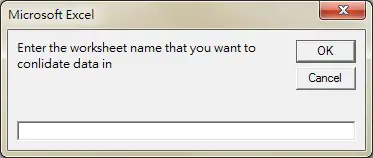
Step 3: Enter consolidation worksheet name
Type consol, then press OK
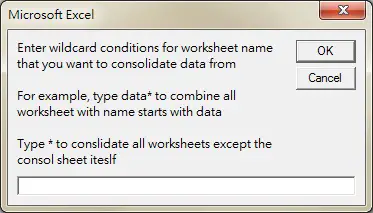
Step 4: Enter worksheet name to consolidate
Assume that we want to consolidate only worksheets names that start with “Sheet”, type Sheet*
Note that Wildcard condition is case sensitive
| Wildcard | Meaning | Example |
| * | Represents one or more characters (any character) | J* any text that starts with J *J starts with any text but ends with J *J* any text that has J in the middle |
| ? | Represents one character (any character) | J? 2 characters that start with J ?J 2 characters that end with J ?J? 3 characters with J in the middle |
| ~ | Treat * or ? as the actual character but not wildcard. Used ~ followed by * or ? | J~** any text that starts with J* ~**J any text that starts with * and ends with J ~?*~* any text that starts with ? and ends with * |
Step 5: Confirm creation of new worksheet
If you already have a worksheet called “consol”, you will not see this message. Click on OK.

Result
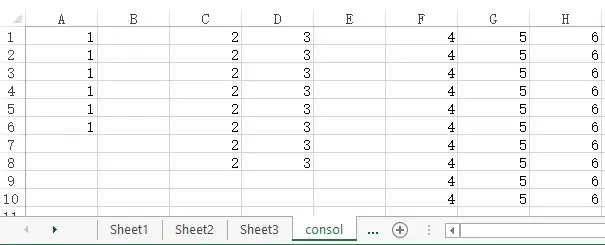
I wrote the code so that it has 1 column blank between the data. If you want to remove the blank column,
Replace
consolPasteCol = wColNm(wColNum(consollastcol) + 2)
with
consolPasteCol = wColNm(wColNum(consollastcol) + 1)