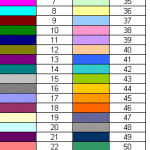
VBA Excel ColorIndex Property

This tutorial explains how to use VBA Excel colorIndex Property to set color and get color from Cell or Shape, meaning of -4142, -4105, xlNone, xlAutomatic What does VBA Excel ColorIndex Property do? VBA Excel ColorIndex Property is to set color or get color for Objects like Cell color and Shape color. ColorIndex offers 56 basic colors plus the following special numbers. ColorIndex Value Explanation -4142 / xlColorIndexNone / xlNone No fill -4105 / xlColorIndexAutomatic / xl...
Read More

VBA Excel RGB Property and get RGB Color

What does VBA Excel RGB Property do? VBA Excel RGB Property is a color Property of Objects, commonly used for Cell color or Shape color. "RGB" stands for Red Green Blue, which are known as three additive primary colors, which can be combined to produce other colors. For example, purple is a mix of blue and red.  In RGB Property, you need to give a value (from 0 to 255) for each color in order to mix a new color. For example, Red = 255 means the brightness of color red is 100%. If you ...
Read More

Excel Hyperlink Function to link to other cell, open website, open document

What does Excel Hyperlink Function do? Excel Hyperlink Function is to create  a hyperlink in a Cell. The hyperlink can be linked to external website or a Cell in a worksheet. In Excel VBA, there is a similar Method called FollowHyperlink, but it actually “go to” hyperlink instead of creating a link for user to click on. Syntax of Excel Hyperlink Function HYPERLINK(link_location, [friendly_name]) link_location The path of the file you want to link to. To link website, type "http://...
Read More

Excel Custom Format in Format Cells

This Excel tutorial explains how to use Excel Custom Format in Format Cells to format date, time, number, text, conditional formatting, leading zero, etc. You may also want to read: Excel Extract Time from Date Time Excel Display Time from Date Time What is Excel Custom Format? Excel guesses the most appropriate format for the cells when you type something in a Cell. For example, if you type 31/1/2014, Excel guesses it would be a Date, Format is dd/m/yyyy, but it would not guess it is...
Read More

Excel maximum number of digits workaround

Excel maximum number of digits In Excel spreadsheet, there is a limit for storing a number in a Cell, which is 15 digits (15 numbers) regardless of whether the numbers are decimal places. Excel call this "15 significant digits of precision" which adheres to "IEEE 754". It is not difficult to understand why Excel limits the number of digits, because some numbers are infinite, such as π number (3.1415....), it is not possible to use infinite computer memory to store infinite numbers. We need to c...
Read More

Auto Open Excel with Windows Task Scheduler

Auto Open Excel with Windows Task Scheduler Windows Task Scheduler allows you to trigger an event in Windows when specific criteria is met. In this tutorial, I will not detail what you can do with Task Scheduler (since there are too many features), instead I will focus on how you can auto open Excel with Windows Task Scheduler. Since I am using Chinese Windows but I want to write this article in English, all the screenshots are copied from the below website. http://www.sevenforums.com/tut...
Read More

Excel 3D Sum to Sum the same Cells in different worksheets

This Excel tutorial explains how to use Excel 3D Sum to Sum the same Cells in different worksheets. You may also want to read: Excel VBA loop through worksheets in the same workbook What is Excel 3D Sum Excel 3D Sum to Sum the same Cells in different worksheets. You can achieve the same task without 3D Sum, but 3D Sum can simply your formula. The name "3D Sum" is not a Function name, you cannot use a Function like =3DSum() , it is just a special way to use SUM Function. Before you know ...
Read More

Access Excel custom split Function to delimit text

This tutorial shows how to create a custom Access Excel VBA custom Function to delimit text with the help of VBA "Split" Function instead of "Text to Columns". Delimit text in Excel (non-VBA) In Excel worksheet, there is a function called "Text to Columns" (Data > Text to Columns) to separate a text by delimiter. For example, Cell A1 contains "a,b,c" and after split by comma, A1 contains "a", B1 contains "b" and C1 contains "c". An alternative way to do that is using Left Function with...
Read More

VBA Excel Split Function to delimit text

 What does VBA Excel Split Function do? VBA Excel Split Function separates a text by delimiter into an array, for example, you can split a text a;b;c;d into array {a,b,c,d}, afterwards you can get the desired array item (starting from 0). Split Function is similar to the action of "Text to Columns". Syntax of VBA Excel Split Function Split(text,[delimiter],[limit],[compare]) text text to be delimited delimiter Optional. String character used to identify substring limits. If omit...
Read More

Excel EDATE Function to add month

What is Excel EDATE Function? Excel EDATE Function is to add (or subtract) specified months to a date. For example, adding 2 months to Jan 14, 2015 would be Mar 14, 2015. Syntax of EDATE EDATE(start_date, months) start_date A date to add months to months Positive integer to indicate to add month to start_date, negative to indicate subtraction By default, a Cell Format is "General" which does not display a date as date format (such as mm/dd/yyyy), instead date is displayed...
Read More